JavaScript Temporal
What is JavaScript Temporal?
The Temporal API is a new standard for date and time management in JavaScript.
The Temporal API is designed to replace the old Date object.
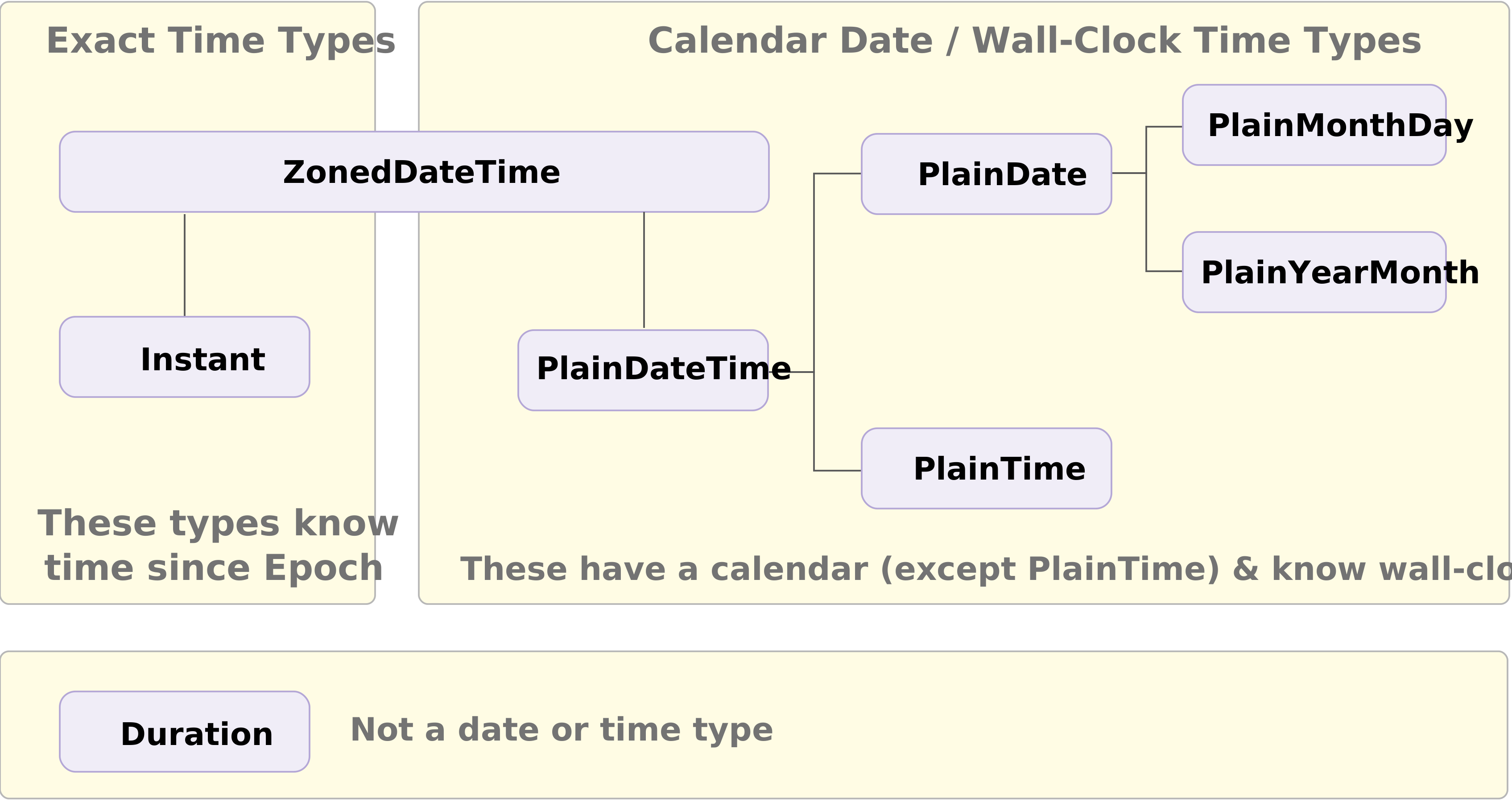
Temporal Date Objects
Unlike Date, Temporal objects are immutable and provide first-class support for time zones and non-Gregorian calendars.
Temporal separates date and time into distinct classes to prevent "wall-clock" errors.
Main Temporal Objects
| Temporal.Now | The current time |
| Temporal.Instant | A fixed point in time, independent of time zone |
| Temporal.ZonedDateTime | Date and time in a specific time zone |
| Temporal.Duration | The difference between two time points |
Temporal.Now
The Temporal.Now object has methods for getting the current time in various formats.
Use zonedDateTimeISO() for the current system time:
Use the plainDateISO() for calender date only:
Temporal.Instant
A Temporal.Instant is a single point in time ("exact time"),
with nanoseconds precision.
No time zone or calendar information is present.
To obtain local date/time units like year, month, day, or hour, a Temporal.Instant must be combined with a time zone identifier.
Temporal.ZonedDateTime
A Temporal.ZonedDateTime is a timezone and calendar-aware
date/time object that represents a real time event from the perspective of a particular
region on Earth, e.g. December 7th, 1995 at 3:24 AM in US Pacific time (in Gregorian calendar).
The Temporal.ZonedDateTime object is optimized for cases that
require a time zone, DST-safe arithmetic and interoperability with an RFC 5545 calendar.
DST-Safe Arithmetic
DST-safe arithmetic ensures time calculations (addition/subtraction) remain accurate across Daylight Saving Time (DST) transitions, preventing 1-hour errors.
It involves using timezone-aware, calendar-aware objects (ZonedDateTime) that understand local clock shifts.
RFC 5545 iCalendar
RFC 5545, titled the Internet Calendaring and Scheduling Core Object Specification (iCalendar), is the industry standard for exchanging calendar and scheduling information.
It allows disparate systems (like Google Calendar, Apple Calendar, and Microsoft Outlook) to communicate seamlessly.
Temporal PlainDate Objects
Plain dates are time-zone-unaware dates and times:
| Temporal.PlainDate | Calendar date only (2026-05-21) |
| Temporal.PlainTime | Time of day only (14:30:00) |
| Temporal.PlainDateTime | Full date and time (2026-01-24 14:30:00) |
| Temporal.PlainMonthDay | Month and day only (05-01) |
| Temporal.PlainYearMonth | Year and month only (2026-05) |
Note
You will learn more about PlainDate objects in the next chapter if this tutorial.
Manipulate Dates
Modify Temporal objects with add() and subtract().
Because they are immutable, these methods return new Temporal objects.
Difference Between Date and Temporal
- Date mixes date and time zone
- Date parsing is inconsistent
- Date is 0-based / Temporal is 1-based
Date and Time Zone
new Date(2026, 4, 1) creates a timestamp of your local time zone at midnight.
This means it can "shift" when you format it in UTC or in another zone.
Example
// Months are 0-based (4 = May)
const d = new Date(2026, 4, 1);
// Might be 2026-04-30T22:00:00.000Z in some time zones:
d.toISOString();
Temporal.PlainDate is not a timestamp.
It is just "2026-05-01" with no time and no time zone, so there can not be any shifting.
Date Parsing is Inconsistent
new Date("2026-05-01") parses as an instant (often treated as UTC by spec in modern JS),
but historically it has been a minefield of different formats, browser quirks and locale surprises.
Temporal avoids this by:
- defining strict parsing rules for ISO strings
- using Temporal.Instant.from() for clearly-typed conversions
Temporal is 1-Based
- Date: January = 0
- Temporal: January = 1 (much more human-friendly)
Example
// May 1:
new Date(2026, 4, 1)
// May 1:
new Temporal.PlainDate(2026, 5, 1)

